How Does Facebook Conversion Tracking Work (and Which Number Is Real)?
Meta valued the same ad account at 1.4x and at 29x in the same period.
Same account. Same money. The only thing that changed was which slice of the account we looked at and which attribution rules were applied to it.
Google Analytics looked at that account, that period, that money, and said roughly 1.5x.
This was a retail brand we audited. Their setup was ordinary. Every one of those numbers came out of Meta's own reporting, working exactly as designed.
That gap is the reason this guide exists. Most founders running Meta ads eventually arrive at the same question. How does Facebook conversion tracking work, and why can it produce numbers that far apart on the same account?
By the end of this piece you will know how the number in Ads Manager gets made, where it stops being a measurement and starts being a model, and which version of it deserves a place in your board deck.
What is conversion tracking?
Conversion tracking is the system that connects an ad someone saw or clicked to an action they later took. A purchase, a lead form, a booked call, an app install.
Without it, an ad platform only knows what it showed and what it charged. With it, the platform can claim credit for outcomes, steer delivery toward people likely to convert, and report a return on your spend.
That last part matters. The same system that measures your results also feeds the algorithm that spends your money. When tracking is wrong, you get bad reporting and bad delivery at the same time.
On Facebook and Instagram, conversion tracking runs through two pipes. The Meta pixel in the browser, and the Conversions API on the server. Everything in your Ads Manager report starts in one of those two.
How does the Facebook pixel track conversions?
The pixel is a small piece of JavaScript that sits on your website and reports visitor behavior back to Meta from inside the browser.
When someone lands on your site, the pixel fires a PageView event. As they move through the funnel, it fires standard events. ViewContent on a product page. AddToCart. InitiateCheckout. Purchase, with a value and a currency attached.
Each event travels with identifiers that let Meta tie it to a person and to an ad. Browser cookies. The click ID that Meta appends to your URL when someone clicks an ad. Whatever customer details you pass through advanced matching.
Meta receives the event in Events Manager, matches it to a user account, then checks whether that person recently saw or clicked one of your ads. If they did, inside the attribution window, your campaign gets credit for the conversion.
That is the clean version, and for years it was enough. Then the browser turned hostile.
Why did the pixel stop being enough?
Three things broke browser-side tracking, and none of them are going back.
iOS 14.5 was the loudest. In 2021 Apple began requiring apps to ask permission before tracking people across other apps and websites. Most people declined. For those users, Meta lost most of its ability to observe what happened after the click.
Ad blockers do quieter damage. A share of your visitors browse with extensions or privacy browsers that stop the pixel script from loading at all. Those people can click your ad, buy your product, and never appear anywhere in your Facebook reporting.
Cookies complete the picture. Safari and Firefox aggressively limit how long tracking cookies survive. A customer who clicks your ad on Tuesday and buys the following week can look like a stranger by the time they convert.
Run on the pixel alone in 2026 and a real slice of your conversions simply never reaches Meta. You pay for outcomes the platform cannot see. The algorithm optimizes on partial information, and your reports undercount what the ads actually did.
Meta's answer to all of this is the second pipe.
How does the Facebook Conversion API work?
The Conversions API sends the same events from server to server. Your website backend, your ecommerce platform, or your CRM tells Meta directly that a conversion happened. There is no browser in the middle, so ad blockers, cookie limits, and script failures cannot silently eat the event.
Server events also carry stronger matching data. A hashed email or phone number from an order record matches a real Meta account far more reliably than a decaying cookie.
The two pipes compare like this.
Meta pixel | Conversions API | |
|---|---|---|
Where it runs | The visitor's browser | Your server or platform backend |
Blocked by ad blockers | Yes | No |
Hit by iOS 14.5 and cookie limits | Heavily | Far less |
Matching data | Cookies, click ID, browser signals | Hashed emails, phone numbers, order data |
Strongest at | Capturing on-site behavior in real time | Delivering conversion events reliably |
The right setup in 2026 uses both, and this is what Meta means by a redundant setup. The pixel fires Purchase from the browser. Your server sends the same Purchase through the Conversions API. Both events carry the same event_id, and Meta uses that shared ID to deduplicate them so one sale counts once.
Get the event_id wrong and the redundancy turns against you. Same sale, two IDs, two conversions in your report. We find this in audits more often than most advertisers would guess.
We are publishing a full breakdown of the Facebook conversion API vs pixel decision as its own piece, because for most brands that setup decides whether their data is usable at all.
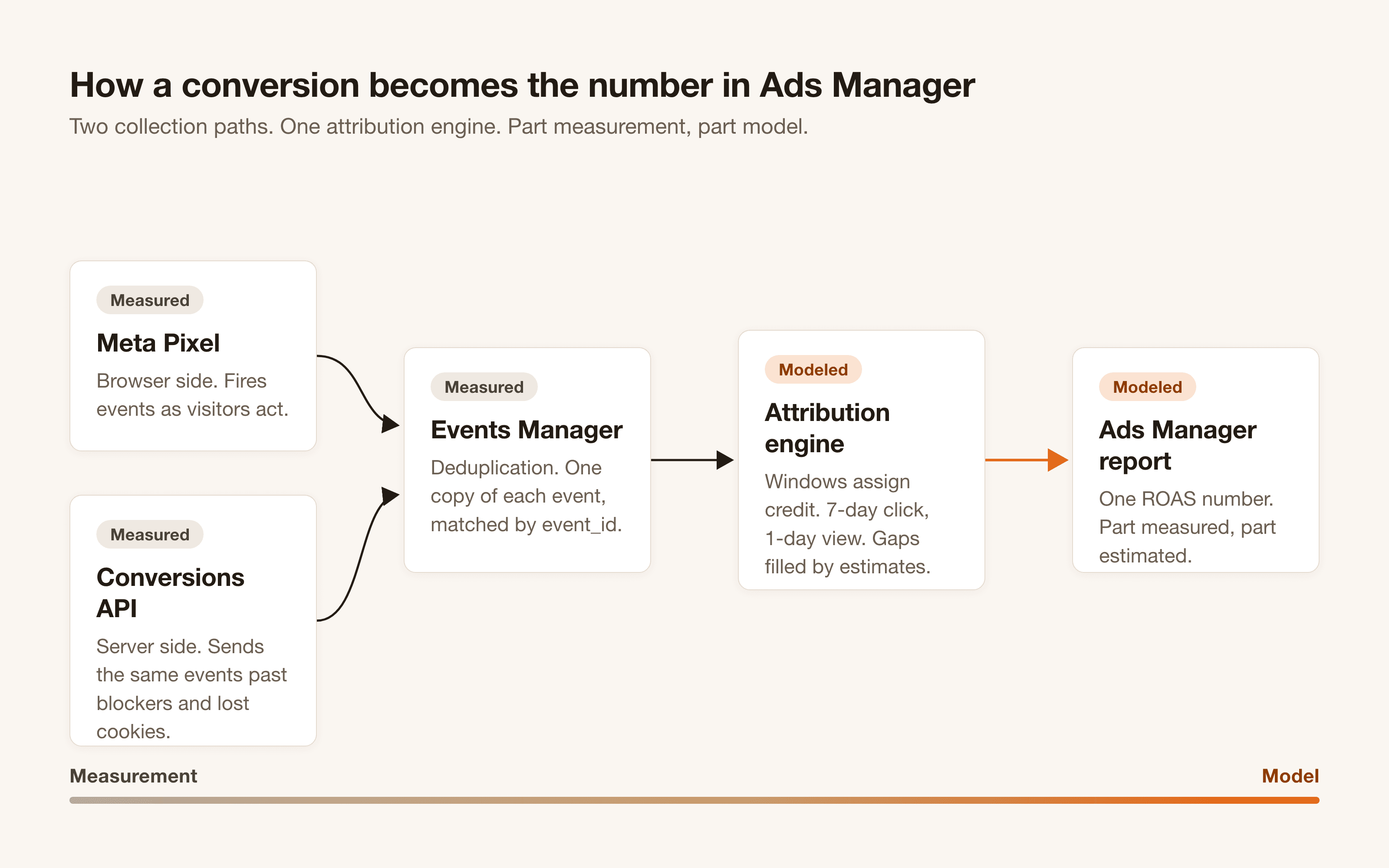
Everything up to this point describes how events reach Meta. What happens after they arrive is where the trust problem starts.
Why is your Ads Manager ROAS different from Google Analytics?
Because the two systems count by different rules, and one of them fills its blind spots with modeling.
Start with attribution windows. By default, Meta claims a conversion if someone clicked your ad in the 7 days before converting, or viewed it without clicking in the 1 day before converting. That second clause deserves a pause. A person who scrolled past your ad yesterday, never clicked, and bought from a Google search today counts as a Facebook conversion under the 1-day view window.
View-through credit is the single biggest source of inflation we find in audits. In the retail account from the opening, changing nothing except the slice and the attribution rules applied to it was the difference between 1.4x and 29x. The sales never changed. The counting did.
Then there is modeling. Since iOS 14.5, Meta cannot observe every conversion, so it estimates the ones it cannot see. Meta discloses this in its own documentation. Ads Manager totals can include estimated conversions, produced by statistical modeling rather than a recorded event. Those Meta estimated conversions are an honest attempt to fill a real gap. They are also, by definition, conversions nobody actually recorded happening.
Google Analytics plays by different rules again. GA4 attributes across every channel you run, gives no credit for ad views without clicks, and loses its own share of data to the same browser restrictions. So GA4 will almost always report fewer conversions for your Meta campaigns than Meta reports for itself. The ads manager ROAS vs Google Analytics gap that unsettles so many founders is built into how each system counts.
Neither system is lying. Each one answers a different question under different rules. The mistake is reading either number as a receipt.
Why am I getting clicks but no conversions?
This question has two families of answers, and your first job is to find out which family you are in. Either conversions are happening and your tracking cannot see them, or conversions are genuinely absent because the funnel is failing.
Signs the tracking is broken.
Sales or leads exist in your backend, CRM, or bank account that never appear in Ads Manager
Events Manager shows PageView firing but Purchase or Lead never arriving
Conversion counts dropped sharply on a specific date, usually a site update, theme change, or checkout migration
Purchases show up doubled, which points at failed event_id deduplication between pixel and CAPI
Signs the funnel is broken.
Tracking verifies clean in test events, and the platform, analytics, and your backend all agree the sales are missing
Visitors reach the landing page and leave before any deeper event fires
The page promises something the ad never set up, loads slowly on mobile, or hides the action behind friction
Targeting is so broad that the clicks were never going to buy anything
The split matters because the fixes cost different money. A broken funnel needs new creative, a new offer, or a new page. Broken tracking needs an engineer. Teams routinely spend months redesigning landing pages when the real problem was a Purchase event that quietly stopped firing after a checkout update.
Work through the first checklist before you touch the second. Tracking problems are cheaper to fix, and they corrupt every other decision until someone finds them.
How do you verify your tracking actually works?
Never trust a green light in a dashboard. Verify with a test you can name.
Start in Events Manager. The Test Events tab shows your events arriving in real time. Open your own site, complete a test conversion, and watch the event appear with the right name, the right value, and one deduplicated entry instead of two.
Check the browser side with Meta Pixel Helper. If your setup runs through Google Tag Manager, use Tag Assistant to confirm the tags fire on the pages and actions you think they do. When a Facebook pixel is not tracking conversions, the failure usually shows itself here. The tag never loads, fires on the wrong trigger, or dies behind a consent banner.
Then apply the rule we hold every account to. Tracking is never declared fixed without a named acceptance test. One specific action, performed end to end, that must appear correctly in the reporting surface. A real test purchase that lands in Events Manager, deduplicates to a single event, and shows in Ads Manager attributed to the right campaign. Until that test passes, the tracking is assumed fixed rather than proven fixed, and assumed is how broken setups survive.
A multi-location fitness brand came to us with reporting that disagreed with their sales data. GA4 said one thing, the bank said another. We traced the gap, found the tracking failure, rebuilt the setup on server-side tagging, and ran the acceptance test until reported conversions matched real sales. Found and fixed. The payoff was immediate, because for the first time the team was making budget decisions on numbers that meant something.
So which number do you trust?
Use each number for the job it is good at, and never promote it beyond that job.
Platform numbers are for optimization decisions. Ads Manager sees relative performance clearly. Which creative, which audience, which campaign wins against the others inside Meta. The absolute ROAS may be inflated, but the ranking is useful. Kill and scale based on it.
GA4 is for cross-channel comparison. It applies one consistent set of rules across Meta, Google, email, and organic, so it tells you how your channels perform against each other even while it undercounts each of them. We hold every channel we run to this standard, paid and organic alike, including our Search Everywhere work.
Your CRM and your bank account are the truth layer. Revenue that cleared needs no attribution window and no model. Once a month, reconcile what the platforms claim against what the business collected. The gap between those two numbers is itself a metric. When it widens, something in the stack is drifting.
Run the three layers together and the 29x versus 1.5x spread stops being a contradiction. Meta's 29x shows the account's best slice under the loosest counting rules. The 1.5x shows what strict, click-based, cross-channel counting supports. The bank shows whether the ads made money. Board decisions come from the third layer. Budget moves inside Meta come from the first.
The number in Ads Manager is a model. Models are useful. Just never confuse one with a receipt.
Frequently asked questions
What is the difference between the Facebook conversion API and the pixel?
The pixel reports events from the visitor's browser. The Conversions API reports the same events from your server. The pixel is easier to install and captures on-site behavior in real time, but browsers and ad blockers can stop it. The Conversions API is more reliable and carries stronger matching data, but needs a server-side integration. Meta recommends running both with shared event IDs.
Do I need both the pixel and the Conversions API?
For any account spending real money, yes. The pixel alone loses events to ad blockers, cookie limits, and iOS privacy settings. A redundant setup lets the server event fill in whenever the browser event goes missing, with deduplication through a shared event_id keeping each sale counted once.
Are Meta's conversion numbers estimated?
Partly. Where Meta cannot observe a conversion directly, mainly because of iOS privacy restrictions, it uses statistical modeling to estimate conversions it believes happened. Meta discloses this in its own reporting documentation. Your Ads Manager total is a blend of observed events and modeled ones, and the report does not split the two for you.
What attribution window does Facebook use by default?
7-day click and 1-day view. Anyone who clicks your ad and converts within 7 days, or views it without clicking and converts within 1 day, counts as your conversion. You can change the setting at the ad set level and compare windows inside Ads Manager, which is exactly how we test how much of a reported return depends on view-through credit.
Why is my Facebook pixel not tracking conversions?
The usual causes, in the order we find them. The base code loads but the event code never fires on the conversion page. A site update or checkout migration broke the tag. A consent banner blocks the pixel before the visitor accepts. Or deduplication is misconfigured and the numbers are wrong in a different way. Start in the Test Events tab of Events Manager and trace one conversion end to end.